The definitive guide to the SEPA converter for automating payments
2026-01-26
A SEPA converter is, in essence, a translator. It takes a data file that you understand perfectly—such as an Excel spreadsheet or a CSV—and converts it into the language that banks understand: the standard SEPA XML format. Instead of wrestling with the structure of those files, the converter does all the heavy lifting in seconds. The result is that your transfers and direct debits are processed smoothly and right first time.
Why a SEPA converter is essential for your business
Managing collections and payments is the lifeblood of any business. When done manually, however, this process is a minefield of risks and costs that are not always obvious at first glance.
Consider an SME that handles, for example, 300 direct debits per month from Excel. Every month, the admin team spends hours copying and pasting data, checking IBANs one by one and adjusting formats so the bank does not reject the batch. It is a huge and delicate task.
This approach is not just slow; it is downright dangerous. A simple typo in an IBAN, a name that does not match the account holder exactly, or a date in the wrong format can bring an entire batch down.
The real cost of manual errors
When the bank returns a SEPA file, the consequences go far beyond a simple error notification. Each failed operation usually incurs a return fee, and these add up quickly. Add to that the time lost investigating what went wrong, calling the client to verify data and regenerating and resending the whole file. It is an operational cost that few people factor in.
In the worst case, these delays in collections can directly affect your cash flow, undermining your ability to pay suppliers or cover day-to-day expenses.
What is more, data shows that well-managed SEPA direct debits can increase conversion rates by up to 12% within the European Union. But that benefit vanishes if your process for generating files is full of bumps and errors that interrupt the flow of payments.
This is where a SEPA converter makes the difference. It acts as a guardian that not only translates your data but validates it before giving it the green light. It is your safety net.
Much more than a simple conversion
Modern conversion tools go beyond being a mere format translator. They add a layer of security and efficiency that completely changes the game in payment batch management. Their key features typically include:
- Automatic IBAN validation: Checks on the spot the structure and check digit of each IBAN to catch errors before they reach the bank.
- Smart field mapping: Lets you tell the system which column in your Excel corresponds to each SEPA field (name, IBAN, amount, etc.), regardless of how your file is organised.
- Regulatory compliance assured: The platform stays up to date with the latest SEPA standard regulations, so you can forget about that technical complexity.
- Reduced fraud risk: By ensuring beneficiary data is correct, it minimises the chance of payments to wrong or fraudulent accounts.
To see the differences more clearly, nothing beats a direct comparison between the old-fashioned method and using a dedicated tool.
Manual vs automated payment batch management
This table summarises the key differences between wrestling with Excel to generate SEPA batches and delegating that task to an automated tool like ConversorSEPA.
| Criteria | Manual process (Excel/CSV) | Automated process (ConversorSEPA) |
|---|---|---|
| Time per batch | Hours, depending on volume. | Minutes, whether 10 or 1,000 operations. |
| Error risk | Very high. Typos or wrong formats are common. | Minimal. Automatic validation filters almost everything. |
| Hidden costs | Return fees, staff hours spent fixing issues. | A clear, predictable service fee. |
| Security | Vulnerable. Files are often stored locally and sent by email. | High. Data is encrypted in transit and deleted automatically. |
| Compliance | Full responsibility on the user, who must know the rules. | Automatic updates guaranteed by the provider. |
In short, betting on a SEPA converter is not a tech whim; it is a strategic decision. It frees your team from repetitive, high-risk tasks so they can focus on what really adds value. And, most importantly, it protects your company’s financial health with a faster, safer and more reliable collections and payments process.
How to turn your Excel files into SEPA XML with ease
The idea of converting a spreadsheet with hundreds of payments into a SEPA XML file may sound daunting—something only a technician could do. But the reality is very different. With the right tools, this process goes from being a headache to a matter of minutes, accessible to anyone. The aim is clear: eliminate manual work, human error and back-and-forth with the bank.
Think of day-to-day: you need to pay salaries or manage collecting direct debits from your clients. Most likely, all that information is in an Excel or CSV file. It is a format we all know and use, but it is light years away from the strict XML language your bank needs to process operations. This is where a SEPA converter like ConversorSEPA comes in, acting as an intelligent translator between your data and banking requirements.
This diagram sums it up. It shows how a conversion tool gets you out of the manual maze and creates a direct, safe path to the bank.
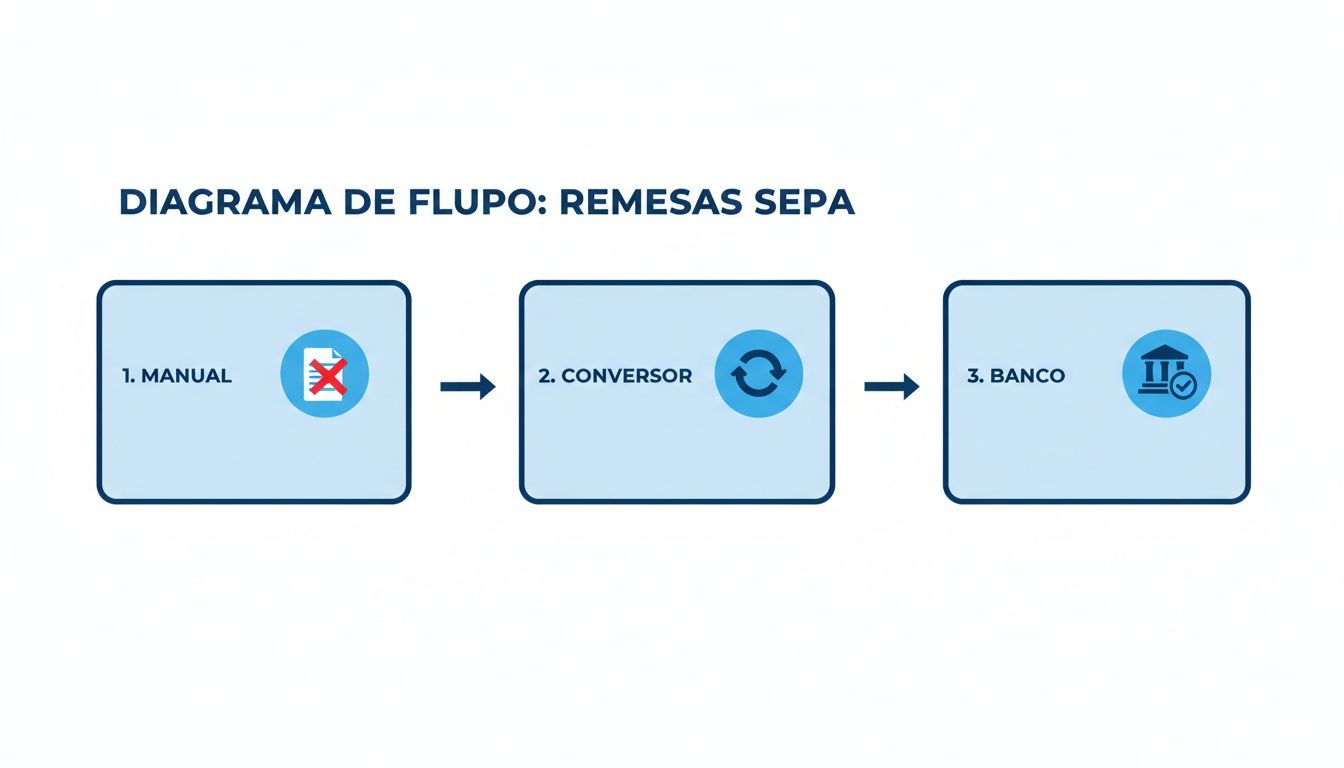
The diagram makes it clear that the manual process is a dead end, while the converter automates the transformation of data so the bank accepts it without issues.
First, prepare your source file
The starting point—and perhaps the most important—is to have your data file well organised. You do not need to be an Excel wizard, but a bit of order will save you a lot of time later.
Make sure your spreadsheet follows simple, consistent logic:
- One row per operation: Each payment or collection should have its own line.
- Clear columns: Assign a column for each important piece of data: name, IBAN, amount, reference, etc.
- Meaningful headers: Use descriptive names in the first row, such as “Beneficiary name” or “Account number”. This will make the next step straightforward.
A veteran tip: before uploading anything, remove empty rows or columns and check that amounts are numbers only, with no euro symbol (€) or other characters. Good preparation is the key to a clean conversion with no surprises.
Smart field mapping: the tool adapts to you
Once you upload your file, one of the most interesting parts of the process happens: field mapping. Instead of forcing you to fit your data into a rigid template, a good SEPA converter adapts to how you work.
The system reads your column headers and suggests a mapping to the fields required for the SEPA file. For example, if you have a column called “Client account”, the tool will automatically associate it with the “Debtor IBAN” field.
The best part is the flexibility. If the suggestion is wrong or you use unusual column names, you can change the mapping yourself. With a simple drag and drop, you tell the system what each field is. This customisation is what guarantees that, however you organise your Excel, the result will always be a valid SEPA file.
This step is crucial, because it is where your working logic is translated into the standardised language the bank understands.
Automatic validation: your safety net
This is where the power of such a tool really shows. After mapping the fields, the platform does not just convert the data. First, it runs it through a thorough validation filter that acts as a safety net, catching the typical errors that cause the bank to return a batch.
This validation checks critical points:
- IBAN format: Ensures each IBAN has the correct structure and a valid check digit for its country.
- Mandatory fields: Makes sure you have not missed any data required by SEPA rules.
- Data consistency: Verifies that amounts are numeric and dates are in the correct format.
If the system finds a problem—such as a mistyped IBAN—it tells you immediately. It tells you exactly where the error is so you can fix it before generating the file. This proactive protection is what makes the difference, saving you the cost and frustration of dealing with a rejected batch. To learn more, you can read in detail how to convert CSV transfers to SEPA XML file and refine your workflow further.
Download the final XML file, ready to use
When your file has passed all validations and you have confirmed everything is correct, the last step is the simplest: click a button. The platform generates the SEPA XML file on the spot, properly structured and ready to upload to your online banking.
This file contains all the information for your operations, organised according to the strict ISO 20022 standards. You no longer need to worry about XML tags, validation schemas or any other technical complexity. You get a file that your bank will process first time, ensuring your payments and collections run on time. It is the peace of mind of knowing the job is done right, so you can focus on what really matters: your business.
Take automation to the next level with API integration
For companies that handle a significant volume of transactions, manual file conversion—however efficient—has a ceiling. The real step change comes when you remove the process of uploading and downloading files altogether, connecting your systems directly to a SEPA converter via its API.

Think of it like this: an API (Application Programming Interface) acts as a direct bridge between your management software (ERP, CRM, billing) and the conversion platform. Instead of someone exporting a CSV, uploading it to a website and downloading the XML, your own system sends the data and receives the validated SEPA file back. All in the background, with no human intervention.
Why an API changes everything
Integrating an API is not just a technical improvement; it is a strategic decision that redefines the efficiency and reliability of your financial operations. By automating repetitive tasks, the risk of human error in handling files drops, literally, to zero.
The benefits are clear:
- Radical efficiency: You can process thousands of payments or collections with a single API call. This frees your team to focus on tasks that really add value, not on moving files around.
- Real scalability: Whether you handle 100 transactions today or 10,000 tomorrow, the process is equally fast and robust, with no bottlenecks.
- Transparent integration: Conversion becomes just another function in your own software. No switching screens or logging into external platforms. It is invisible to the end user.
When your operations depend on automation, reliability is key. A system like ConversorSEPA’s, with a guaranteed 99.9% availability, gives you the assurance that your payment flows will never be interrupted, regardless of load.
Security as the foundation
Of course, when we talk about connecting systems that handle banking data, security is the top priority. A well-designed API is protected with robust authentication so that only your authorised applications can communicate with it.
The industry standard is the use of API tokens. This is a secret, unique key that identifies your system. Every request you send to the SEPA converter must include this token. It is like the key that opens the door. In addition, all communication travels over encrypted channels (SSL/TLS), ensuring data is protected from prying eyes while in transit.
This double layer not only protects your information but also ensures compliance with the strictest data protection regulations.
How it works in practice
To give you an idea of how simple it is for a developer, here is how you would send a batch of transfers. Typically, a data format such as JSON is used, along with tools like cURL or language-specific libraries (Python, PHP, etc.).
Example API call with cURL: ~~~ curl -X POST https://api.conversorsepa.es/v1/remesas \ -H “Authorization: Bearer YOUR_SECRET_API_KEY” \ -H “Content-Type: application/json” \ -d ‘{ “tipo”: “transferencia”, “datos”: [ { “nombre”: “Proveedor A”, “iban”: “ES8021000000000000000001”, “importe”: “1250.75”, “concepto”: “Factura 2024-05A” }, { “nombre”: “Proveedor B”, “iban”: “ES7500490000000000000002”, “importe”: “845.00”, “concepto”: “Factura 2024-05B” } ] }’ ~~~ As you can see, the structure is very intuitive. Your system simply builds a data package with the transfer information and sends it. The API takes care of the rest: it validates each field, generates the XML according to SEPA rules and returns the file ready to use or, if something fails, a clear, specific error message so you know what to fix.
A real case: the accounting firm that automated payroll payments
Imagine an accounting firm that at the end of each month handled payroll for hundreds of clients. Their team spent days exporting data, cleaning Excels, uploading files one by one and sending the XML back to each company. A manual, tedious process where a small mistake could cause a big problem.
They decided to integrate the SEPA converter API into their HR software. The change was total. Now, a single click in their system triggers a process that sends all payroll data to the API. Within minutes, they receive all the SEPA files back, fully validated, sorted by client and ready to send to the bank.
The result was a huge reduction in time spent on this task and the elimination of manual errors. The team now uses those hours to provide better advisory service to their clients. If you want to explore this route, you can start by checking whether the SEPA converter has an API compatible with your system.
Common errors in SEPA files and how to avoid them
Having the bank return a SEPA file is not just a minor nuisance. It is a full stop for your cash flow that will cost you time and, almost always, money. The good news is that the vast majority of these rejections can be avoided. They are usually simple human errors or format issues that a good SEPA converter catches on the fly, before the file even reaches the bank.
When you face a rejection, the tedious part begins: deciphering error messages that seem to be in another language, going through your data line by line and, often, starting the whole process again. This friction builds up, and what was a simple procedure turns into unexpected costs and delays in payments or collections that cannot wait.

Fortunately, if you automate file creation, the picture changes completely. Conversion platforms act as quality control that lets nothing through, ensuring every batch you send meets banking standards first time.
The usual suspects behind rejections
From experience, we know that certain errors repeat over and over. They are the small mistakes that can cause big trouble, but with the right tool they are detected in seconds.
Here is a list of the most typical failures we come across every day:
- Incorrect IBAN format: The undisputed champion of rejections. A wrong digit, a check digit that does not add up or an incorrect country code. Automatic validation checks the mathematical structure of the IBAN and alerts you immediately.
- IBAN and account holder do not match: The beneficiary or debtor name must match exactly what the bank has on record. Sometimes something as simple as using “Ltd” instead of “Limited” is enough to trigger the alarms.
- Invalid execution dates: Sending a batch with a date that has already passed or that falls on a weekend or holiday is a classic error. The system blocks it immediately.
- “Forbidden” characters: The SEPA XML format is very strict and does not allow special characters such as “ñ”, accents or odd symbols in fields like the reference or name. A good converter cleans or replaces them for you.
Although they may seem trivial, any of these issues is more than enough for a bank to reject the entire batch. If you find you keep stumbling on the same issue, our guide on errors when converting a transfers CSV may give you more specific pointers.
The upcoming switch to structured address
Beyond day-to-day errors, a regulatory change is coming that will affect all companies: the mandatory move to structured address in SEPA files.
Until now, we could use an “unstructured” address field and put all the information in at once (street, number, city, etc.). Well, that format’s days are numbered.
The transition to structured address in SEPA is a before and after. From March 2025 it can start to be used, but from November 2026 it will be mandatory. Files that still use the old format will simply not be accepted.
This new rule requires us to split the address into separate fields: street type, street name, number, postcode, town and country. This gives much greater precision and makes it easier for systems to validate data automatically.
It is not a minor change. The new regulation brings stricter validation to ensure that the IBAN and the account holder’s name match, which is estimated to potentially reduce fraud and errors in 30% of problematic operations. For Spanish companies, where nearly 70% of SMEs still depend on legacy software, this is a real challenge. In fact, the Bank of Spain estimates that 25% of current rejections due to format issues already represent losses of around 500 million euros per year in fees and delays.
How a SEPA converter prepares you for what is coming
The best way to avoid both the usual errors and the new regulatory challenges is to use a tool that is always one step ahead. A service like ConversorSEPA is already fully prepared to generate files with the structured address format. So when the time comes, your payments and collections will not be left in limbo.
The platform does not just convert your data; it reviews, validates and enriches it. Think of it as a guardian that alerts you to anything that does not add up before it becomes a real problem, ensuring every file you send is perfect.
Get ready for the future of payments with SEPA regulation
The world of SEPA payments never stands still; it is an ecosystem that keeps evolving. For any company, trying to keep up with every regulatory update can become a real headache and is risky. A small change in the rules can make files that worked perfectly yesterday get rejected today.
That is why it is so important to have a SEPA converter that is more than a simple tool: a living service. A cloud platform takes care of updating itself with every regulatory change, freeing you from that burden completely. It is like having a SEPA expert working for you 24/7, ensuring your operations always comply with the latest version of the law.
And this need to be agile and precise has become even more critical with the arrival of instant transfers.
The impact of instant transfers on your processes
SEPA instant transfers (SCT Inst) have changed the rules of the game. They have completely transformed what businesses and consumers expect from a payment. No more waiting days for money to arrive. This race towards instant execution demands that the way we generate payments be faster and, above all, much more accurate than ever.
In Spain, adoption has been massive: instant transfers already account for over 63% of all euro transfers. This explosive growth, which you can read more about in the National Payments Committee report, shows that instant is the new standard. This reality only underlines the urgency of using tools like ConversorSEPA, capable of turning legacy formats like AEB into valid SEPA XML in seconds and without errors.
With instant transfers, the margin for error is zero. A badly generated file is not just a technical rejection; it is a payment that was expected immediately and that stops dead. And that inevitably creates friction with clients or suppliers.
Outsourcing file conversion to a cloud service protects you from all this complexity. You forget about following regulations, interpreting changes or applying updates. You simply upload your data and get a file that works. Always.
This approach lets you reap all the benefits of instant payments without suffering their technical demands. It is, without doubt, the smartest way to adapt your operations to the speed the market demands today.
The PSD3 and PSR directives on the horizon
But the regulatory horizon does not stop there. The next major evolution that will define the future of payments in Europe is already in the pipeline: the Payment Services Directive 3 (PSD3) and the Payment Services Regulation (PSR).
Although the details are still being negotiated, the main objectives are clear. In short, they aim to make payments even more secure, better protect consumers against fraud and open the door to greater competition and innovation in the sector.
How does this affect you in practice?
- Stricter verification: Systems will be strengthened to check that the IBAN and the account holder’s name match on transfers. It is a key measure to combat fraud.
- Greater transparency: Fees and conditions for payment services will have to be even clearer for everyone.
- Data access (Open Banking): Rules will be improved so that financial technology (fintech) companies can securely access banking data, always with the customer’s permission, to offer more innovative services.
Preparing for these changes may seem overwhelming, but it does not have to be. The conclusion is the same: delegating the technical side of SEPA conversion to a specialised service isolates you from this complexity. A provider like ConversorSEPA takes on the responsibility of adapting its platform to each new directive. So your files are always one step ahead of regulation, without you having to lift a finger.
We answer your questions about SEPA conversion
If it is your first time generating a SEPA file, it is completely normal to have a lot of questions. To make everything clear, we have gathered here the most common questions our users ask and given them a direct, no-nonsense answer.
What types of files can I use?
The idea is that the tool adapts to you, not the other way round. That is why we have focused on compatibility with the formats used in the day-to-day of any company:
- Excel (.xls and .xlsx): The king of spreadsheets and the format most of us use to keep our accounts.
- CSV (comma-separated values): A classic. A plain text format that works with practically any program you can think of.
- JSON: This is more technical, aimed mainly at developers who want to connect their systems to our ConversorSEPA API and automate everything.
We also know that many companies have come from working with the old bank books. So you can also convert AEB regulation formats, such as book 19 for direct debits or 34 for transfers. That makes the transition to SEPA much smoother.
Is it safe to upload a file with banking data?
Absolutely. The security of your data is something we take very seriously. The entire process is protected with the same technology your own bank uses.
From the moment you upload the file, the connection is encrypted with SSL/TLS, so no one can intercept the information while it travels over the internet. But the most important part comes after: as soon as you download the SEPA XML file, the original data you uploaded is automatically deleted from our servers. This process is completed in just 10 minutes. We do not keep anything.
Think of it like a private conversation: once it is over, there is no trace. This automatic deletion is our way of ensuring your confidential information is not exposed a second longer than necessary.
I have an Excel with my own columns. Will it work?
Of course. We know perfectly well that no two companies organise their Excel sheets the same way. Everyone has their own habits, column names and order.
That is why our system lets you “map” the fields. It is very simple: during the process, you just tell the platform which column in your file corresponds to each SEPA field. For example, you indicate that your “Client Account” column is the “Debtor IBAN”. If your file is particularly complex, do not worry—our support team can help you get it configured.
Do I need to install anything on my computer?
Not at all. A SEPA converter like ours is a 100% online tool. There is nothing to download or install.
You connect through your browser and that is it. This has two huge advantages. First, you can generate your batches from any computer, whether at the office or at home. Second, you will always be using the latest version, updated to the latest SEPA regulation, without worrying about installations or security patches.
Want to start simplifying your batches and leave the headaches behind? With ConversorSEPA you have it done in the fastest and safest way. Try it free now and see how easy it is.